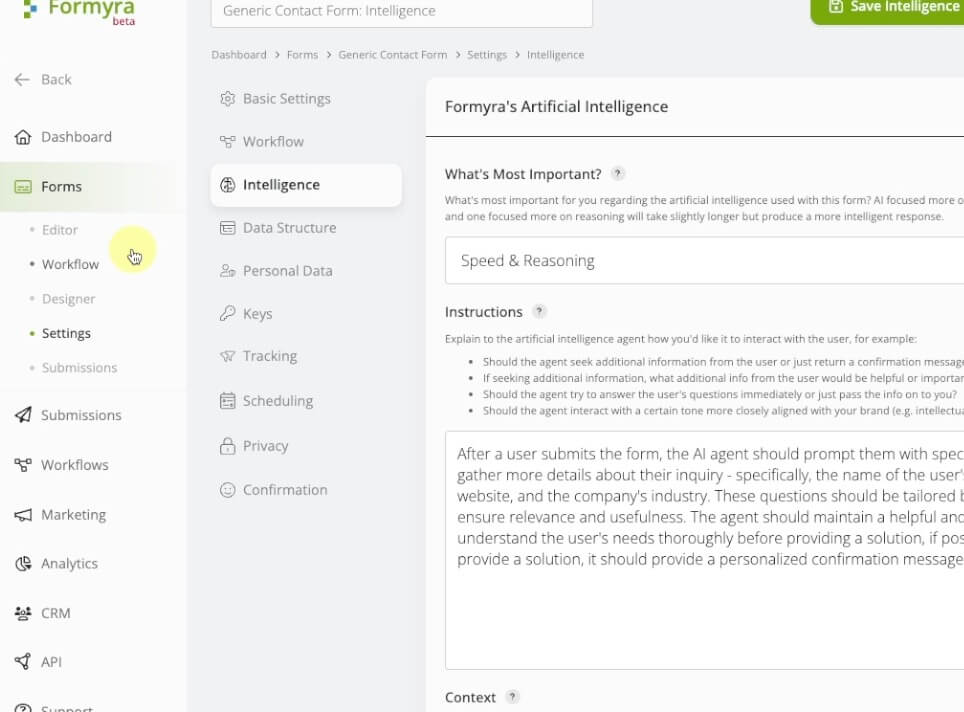
Automated Workflows
Automate your post-form tasks with workflows that instantly trigger unlimited actions.
New FeatureEnable forms to be filled out by voice!
Let prospects self-assess their security on your site. Use Formyra to build a quiz that scores, advises, and converts.


Try this demo!(imagine a form like this on your site!)
High-risk visitors get flagged, scored, and routed—before you even get on a call.
Prospects get tailored feedback instantly, proving your expertise from the very first click.
No more chasing. Formyra can trigger emails, book consults, or tag leads in your CRM.
Your quiz shows expertise and value upfront—earning trust while visitors engage.
Customize every question and result to align with your services, risk model, and advice.
Let Formyra score responses, trigger follow-up actions, and generate reports—all automatically.

Most cybersecurity leads aren't ready to talk. This form gets them there.
Ask five smart questions and show them why they need your help—without pushing.
When they're ready, your calendar link is already in their inbox.

Built for cybersecurity providers ...
Create interactive risk assessment forms that educate and convert—no code needed.
Forms respond with a score and specific feedback based on answers.
Trigger emails, CRM updates, or booking links instantly after submission.
Filter junk and bots with AI—only real leads make it through.
Track drop-offs, conversions, and user behavior to improve results over time.
Send data to your CRM, Slack, Sheets, or any webhook endpoint.
Match your brand, customize logic, and control every input and label.
Show follow-up questions or custom results based on responses.
Test question phrasing or layouts to boost quiz completions.
Use AI to guide responses, follow up, and personalize the experience.
Most small businesses know cybersecurity matters—but they don't know how at risk they are. A well-built risk quiz gives them clarity, and gives you a qualified lead.
Formyra helps you build that quiz. You choose the questions (MFA use, phishing tests, backups), the logic (how to score), and what users see based on how they answer.
If a business skips training and doesn't use MFA, your form can flag them as “High Risk,” give practical tips, and invite them to book a free consultation. No phone calls, no email tag.
Every step can be automated: follow-up emails, calendar invites, CRM updates, tagged leads. It's a way to pre-qualify serious prospects and eliminate guesswork in your funnel.
This is how smart IT providers convert traffic. A 5-question form does the job of a full sales call—without wasting your time.
All our plans kick off with a 14-day free trial on us!
Whether you're testing a quiz idea or running full campaigns, Formyra makes setup, logic, and automation easy.
Paid Annually
Paid Monthly
What's included:
What's included:
& everything in Starter!
Unlimited workflow and intelligence use cases!
Our users are leveraging Formyra's intelligent forms and native workflows to save real money and measurably grow their businesses!
To facilitate remote learning by allowing students to upload assignments, with AI providing initial feedback and grading assistance.
To create a raffle entry form and automatically pick a random winner each week, then send a personalized congratulations email.
To simplify academic admissions by uploading transcripts and portfolios, with AI evaluating credentials and matching applicants to programs.
To generate an infographic snapshot that visually summarizes key data points from a single submission for social sharing.
To gather product feedback and automatically score submissions based on sentiment analysis, triggering follow-up calls for negative reviews.
To run influencer campaigns by collecting user-uploaded content, with AI assessing engagement and verifying authenticity.
To manage a student registration form, track course selections, and generate class rosters in a single workflow.
To manage warranty claims by uploading product images and proofs of purchase, validating claim legitimacy with AI, generating claim tickets, and notifying service teams.
To operate a remote work check-in, use AI to gauge employees’ stress levels in weekly surveys, insert a one-week delay for them to reflect, and if stress remains high, notify HR to schedule a wellness session.
To streamline onboarding for new hires by uploading identification documents, with AI verifying credentials and triggering background checks.
To run a loyalty program by uploading purchase receipts, calculating points with AI, generating reward notifications, and updating customer profiles automatically.
To track employee performance reviews, generate AI-driven competency scores, pause for a one-week manager feedback window, and if any score is below a preset threshold, auto-assign relevant training modules.
To evaluate properties, where agents upload images and floor plans and AI provides preliminary condition reports for accurate valuations.
To gather ideas for product improvements, use AI to cluster similar suggestions, and rank them for the product team’s review.
To create a billing inquiry form that calculates the estimated invoice adjustment and sends a detailed confirmation to accounting.
To optimize social media campaigns by uploading ad creatives, testing performance with AI, refining visuals, and scheduling optimized posts.
To support construction projects by uploading site photos, with AI monitoring progress and flagging safety hazards.
To coordinate maintenance requests by uploading fault images, having AI prioritize repairs, generating work orders, and alerting technicians immediately.
To facilitate warranty claim submissions by uploading proof of purchase and product images, with AI assessing damage for claim approval.
To poll employees about their remote work preferences, then dynamically create scheduling suggestions for team leads.
Capture demand, show value, qualify in one step ...
Small businesses search terms like “cybersecurity quiz for companies” and “IT security checklist.” These aren't browsers—they're decision-makers actively assessing risk.
By placing a short quiz on your site, you give them instant value. You help them self-assess, learn something useful, and realize where they need help. That builds trust and speeds up sales.
IT providers use Formyra to ask simple, impactful questions—like whether MFA is enabled or phishing tests are run. Responses trigger tailored advice and a risk score, all in real time.
And with Formyra, it's not just a static form. The experience is dynamic. Based on their answers, users can be tagged in your CRM, sent a personalized PDF report, or prompted to book a call.
Use it in ads, in newsletters, or directly on your site. It works as lead gen, education, and outreach—all at once.
Cybersecurity teams can use Formyra to create internal assessments, phishing readiness checks, or compliance surveys. Use conditional logic to tailor advice or direct follow-ups to the right person.
These forms keep your internal training and audits on track without spreadsheets or endless reminders. Automate reporting, scoring, and routing in just a few clicks.

Create your first form in minutes - no code, no stress.
Drop it onto your site with a simple embed.
Set up instant email notifications and start collecting real submissions right away.
Use conditional logic to personalize the experience for each user.
Integrate your favorite third-party tools—CRMs, email platforms, whatever you already use.
Build automated workflows that handle the follow-up for you, 24/7.
Dive into the analytics and see how users are actually interacting.
Run automated A/B tests to fine-tune performance without lifting a finger.
Watch your conversions grow while Formyra quietly does the heavy lifting in the background.
VideoSee how easy it is to get started!
Formyra lets you build and deploy a workflow-connected quiz fast. Drag and drop the inputs, add your logic, and connect follow-ups.
This video shows how to launch a dynamic cybersecurity form—from scratch—in less than 10 minutes.